Showing posts with label social media help. Show all posts

Tuesday, 2 October 2018

Scheduling Tweets - How, Why and Where?


I'm now juggling three Instagram accounts, two Twitters and two Pinterests and that's before I take on any clients through Strange Marketing. I'm working hard to become more organised, trying to make sure that some content goes out on each platform, each and every day - no easy task!

Although I've written before about automation and why I think it's killing Instagram (click here for that cheerful piece!) there are certain situations where using an automated posting platform is beneficial and can keep your content flowing smoothly allowing you to focus on other things.
It's well documented that one of the curses of the modern world is the amount of time we spend bent looking at our phones. Obviously, many of us have chosen to work in the digital space and with that comes a requirement to be connected the majority of the time. However, I can't be alone in facing that awkward 'you spend more time on your phone than anything else' conversation with relatives or friends.  It sounds pretty frivolous to explain that if you aren't there, posting content at certain times you won't gain the traction that you need to launch a project, or grow as an influencer. Automation means you gain a tiny bit of your life back, bundling the time spent tweeting into one handy segment - I do it on a Monday morning.

That's not to say that as a small business or Influencer you won't need to pop on and check reactions and reply to engagements - but it does mean that when you want to focus on your real life, your social channels are ticking along nicely, looking active and gaining interest.

In addition, automating your tweets means you aren't creating it on the fly. You aren't trying to type it out on your phone scrunched into a wet bus seat where you might not have access to all your file directories (please tell me I'm not the only ones whose iCloud hasn't updated in 134 days?) this ultimately means you have more control, as you'll have everything to hand when you create your posting schedule.
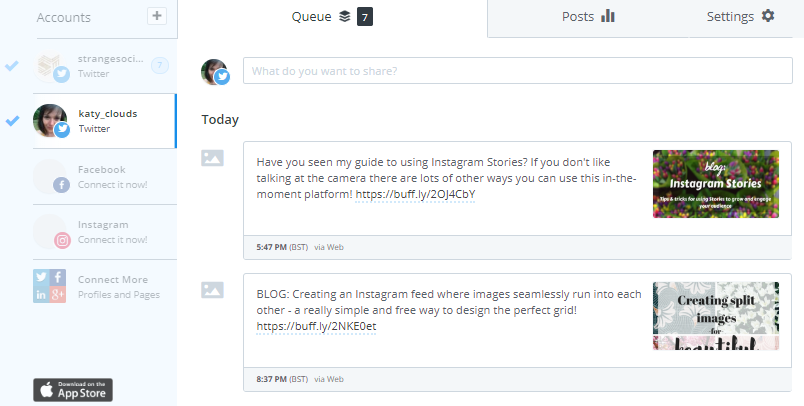
The type of content that works best is direct links to your blog or other promotional tweets, general questions to the twitter community or cross-platform promotion of your other social profiles. Here is an example of one of my recent tweets that I created through Buffer and posted out automatically to my profile at an optimum time.


By using automation in this way, I'm making sure that my blog is being promoted throughout the week. I'll add to this with tweets of my own ad hoc, but knowing that my profile is looking active, sharing my blog links and generating engagement without me having to spend the time hooked up to my mobile.

Over the week, I'll mix things up, sharing blog posts from my back catalogue that haven't got a lot of love recently as well as questions that I hope will get engagement - when I was blogging festivals during the summer, for example, I threw a few questions about favourite gigs and live music events into the schedule.
In order to answer this question, I tried out three platforms. I'll include some thoughts on each below but I think it's pretty clear which one I would recommend!

  • Hootsuite - I've got a premium Hootsuite account because I plan to use it when managing my clients social media. It's a market-standard platform with a lot of useful features and the ability to review and engage with multiple social platforms through it's interface. You can schedule tweets quite simply, just type what you want to say into a box, add a link or image and then select a time that you want it to go out - their Autoschedule features will post the content at a peak time for you. You can have 30 scheduled posts per month if you are a free user. One of the great benefits if you are using Hootsuite for business is bulk uploading, you type all your updates into a spreadsheet and mass upload them to be posted at optimum times!

  • Recurpost - Oh Recurpost, I had such high hopes for you! Recurpost is a scheduler that works in a different way, you create Libraries around a certain theme (so, blog posts, jokes, memes, whatever you want to share) and then for each Library you create tweets. For each tweet, you then create several variations. You add the Library into a schedule which is optimised for your timezone and Recurpost will post out your tweets and variations until your library is empty and you need to start again. Main issues for me were that it didn't post images as part of the variations, just links, and when the Libraries were empty it was a real faff taking everything off the schedule and starting again! I can see this being really useful if you want certain content going out on certain days but for me there was a lot of unnessecary messing around.

  • Buffer - The dream. Super easy to work, free users can add up to ten updates to their queue at a time, you can select what times they go out or Buffer will optimise it for you. It's really easy to add images to each update and to make it even easier, if you include a link, Buffer will pull images from the site for you to select which for many of us Pinterest-optimised bloggers means not sitting around waiting for images to upload, just type in the text, copy the link, chose the image and it's a go. I wish I'd known about Buffer before paying for a premium Hootsuite membership because it's so much simpler, the interface is nice and it works like a charm.


I hope this has helped! I would love to here your reviews of platforms that perform a similiar task - I'm always looking for ways to streamline managing several social accounts and still growing on all of them.


Thursday, 6 September 2018

Instagram Stories For Your Small Business


Now the summer has come to an end it feels like it's time to really buckle down and get some work done. In the words of Bret and Jermaine, it's officially Business Time.

I'm working on launching my business, Strange Marketing (visit the site by clicking here!) and in doing so have been looking into which niches my expertise actually covers. One of the things I haven't seen a huge amount of people giving advice on is Instagram Stories and how to use them to promote your business and grow your brand so here I am today to give some of the knowledge that I gained as an agent to Instagram influencers in my previous job.

Instagram Stories is a feature of Instagram that allows you to create in-the-moment content that is visible to your audience for 24 hours. It's indicated by a purple and orange circle around your profile picture. When I look at followers or search for someone on Instagram, I like to see that circle around a profile picture as it shows that person is actively sharing new content, it's not a dead account or one that hasn't been updated for a while. This automatically makes them more attractive to follow.

Influencers, that is, users with a following of more than 10,000, have access to a feature that means they can add a link to their Stories. By swiping upwards on the screen, the watcher will be taken straight to the link. This is a fab way to get people to look at a blog post or go straight to a retail page where they can make a purchase, which can be extremely beneficial when it comes to using affiliate links. For the rest of us, who are growing their business and haven't hit that magic 10K mark, there are lots of ways you can use Instagram Stories to generate engagement, interest and purchasing action with a little clever thinking.

So, let's get to the meat, How can you use Stories in the best way for your business?

BUILDING YOUR BRAND

For any business, whether you design beautiful handmade goods or provide some sort of service (like my social media strategy services) it's important to build trust and be recognisable. The average internet user has an attention span of 8 seconds when it comes to content. If you can't get them in that time, they will swipe your Story away and be on to the next one. If everything you post looks different, random and unconnected, you aren't going to register in your audience's mind and they won't necessarily look out for your content.

You can use fonts, apps colours or filters to give your Stories a cohesive look. One of my favourite Instagram Story users is Lauren from girlstolelondon. She uses the same colours and the typewriter font, often with a simple line underneath the text as well as an app which allows you to put two pictures or videos on one Story for the majority of her static (non-talking directly at the camera) content on the feature. Here's some examples, which I hope she won't mind me using:


Use of black and white, a specific font and a defined style means that even when I'm idly scrolling through Stories, her content stands out and I instantly associate it with her. You can apply this tactic to your business really easily! Here are some ideas:

  • Stick to specific colours and fonts for your text. Chose something that goes with your brand, perhaps your logo colours. Don't forget you aren't limited to the little circles of colour, you can use the dropper to select any colour visible in the image and if you 'long press' on one of the circles you'll be offered the whole rainbow! 

  • Keep your text short and informative so that watchers can read it quick, even if they are shooting past your Stories. You can actually see stats about how many people clicked forwards, back or exited your Stories through your Insights. 


  • Frames can look good, although you would have to add them in another image editing program. I like to use A Design Kit (available for Android and IPhone) on my Stories to give them a fun look sometimes, but I have to admit I'm much more likely to just stick a GIF on there!
If you are brave enough, use talking Stories. Talking directly to the camera isn't something everyone is comfortable with, but it definitely gives your audience a better idea of who you are and can help people feel that they 'know' you. I don't see anything wrong with whacking a filter on your face if you want to - using the same one with every talking Story is a another way of creating cohesive content.

BEHIND THE SCENES

There are so many ridiculously beautiful Instagram feeds out there - I literally don't know how people have the time and inclination to only take photos that are pink and burgundy, but it's pretty common. The Instagram feed for my business is kind of beautiful and I'm really proud of it, the images run into each other (I wrote an article on how I achieve this here) but it definitely means there isn't much room for sporadic content! Anything that isn't part of my carefully curated grid can go in Instagram Stories though, which leaves lots more room for sharing extra info and insights into the business and my day-to-day life.

One of my favourite people for showing serious behind-the-scenes is Gummergal, an American blogger, her feed is what dreams are made of with a perfect house and baby and outfits, the lot. But her Stories are hilarious and often show the real house behind the blogger, mess everywhere, food covered baby. It really helps to build a bigger picture of her life and makes everything seem ultimately more real.

Another account I love for using their Stories to show sneaky peeks of behind the 'gram is dreamlandclothing. I LOVE their fun eighties prints and their grid is beautiful, all purples and pinks and eighties influences without being too rigid. They use Stories to share peeks of new collections as well as silly behind the scenes stuff that wouldn't fit on the grid.


Here are some ideas for doing this yourself:
  • Share pictures of your work-in-progress. For handmade businesses, this can create some really fun engaging content for your fans and followers as well as show how much work, energy and effort goes into creating your product.
  • Sneak peeks of upcoming content (a corner of a new piece of art, an off-cut of fabric) can build excitement for your upcoming product launches. Or, use GIFs to cover up elements of an image to create suspense - more about GIFs below.
  • Create a video tour of your workspace, studio or office. People are always interested in this type of content and it adds to the picture that you are building of your business. You can use your voice or text to describe what you are showing. Don't forget you can film with your phone in the normal video setting then add to Stories afterwards, which means you can edit before sharing. Most apps for editing include support for video content now too. My favourite is A Color Story, whose filters give my video a dreamy quality and it's free!

ENGAGEMENT

Getting people to engage with you and your business is the whole point of using Instagram, or in fact, any social media. Whether that engagement is a like, a comment or a click through to your website, creating content that gets people to interact with it is everything. Instagram Stories gives you lots of ways to get people to engage with you.
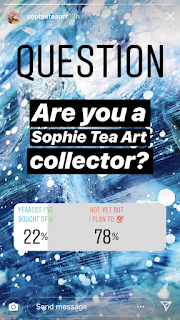
  • Use polls. One of my favourite Instagrammers uses polls in the best way I have seen. Sophie Tea, an artist based in the UK who creates the most cosmic abstract paintings, uses polls regularly on her Stories to get her audience to engage, and both of the options she offers are positive. There's no room for negativity right? The majority of people want to answer polls and there's something almost automatic about reaching to tap the answer you most agree with, so this little psychological trick of offering only positive options does a lot to build positive brand awareness for Sophie.
  • Ask people directly to message you. Every Instagram Story has the option to send the creator a message at the bottom. Remind your audience regularly that you are open to communication and you can also screenshot and share any lovely messages you receive, tagging the sender in. This has a significant impact on people getting in touch with you, as everyone wants shout-outs to build their own following. 
  • Questions! Instagram recently added an option to ask a question to your audience and many of the people I follow use it to do something like 'Ask me anything' - you get the option to share the responses as part of a Story which creates great interaction with your potential customers.

TURNING STORIES INTO SALES

So, once you have created some fab videos that kind of all look like they are coming from you and share with your audience stuff that you probably wouldn't on your regular feed, it's time to get a return on your investment. When I used to speak to clients about the benefits of using Instagram, I would explain the three things they had to gain; brand awareness, gaining followers and direct sales. It goes without saying that brand awareness + gaining followers = direct sales! 

Raising brand awareness is covered by all that stuff above. Creating a cohesive look and style for your stories, getting people to engage with you and sharing content that shows behind the scenes of your business - brand awareness level 100! Instagram Stories is primarily for your current audience as unless you are huge on Insta you are unlikely to show up on the Explore page. but there are ways to gain exposure to a new audience too. When I tag my stories with a location, even if it's just my local town, they get 100's more views and I tend to gain a few extra followers too. You need to add the location tag into each Story you do in a series - don't forget to add a slide that recommends people follow you for more great content! This works because people can follow locations. For more on following hashtags and locations, read my recent article here! Add at least one hashtag to every Story too. I recently found this great article on popular hashtags for independent businesses.

Don't forget to use 'Link in bio' whenever you are talking about anything that your audience might want to buy - you need to make it as easy as possible to find your products. There are some really cute GIFS you can add to your Stories that say Link In Bio too - use them often! I love GIFS, my favourite ones are the drawings that look like they are coming out of something. With a little ingenuity it's possible to create a really fun and engaging Story out of something pretty mundane. Use your imagination when searching for GIFs and you'll find some really unique artwork, it's definitely worth a browse every so often to find more obscure, underused images. GIFs also have the benefit of adding something moving and eye-catching to an otherwise static image which might be enough to get a casual browser. 

I hope this has given you some ideas about how to use Instagram Stories to promote your business. There is so much more to cover, from highlights, to going live and all of the other features that Instagram offers it's community, but I kind of feel like I have rambled enough already.  I'd love your own ideas, success and failures to form part of this resource for others so please leave a comment if you have anything at all to add! If you want further help, I'm currently offering a free 20 minute consultation as part of my business launch where I'll offer a review and some personalised ideas on how you can use Stories to grow your biz and get your audience engaging - drop me an email on katy (at) strangemarketing.co.uk

Have a wonderful day and please do follow my new biz on Instagram for more tips on making social work for your small business - @strangesocialmarketing

Katy x

Sunday, 12 August 2018

How To Create Beautiful Split Images For Instagram


I've been spending quite a bit of time over the last few months setting up my own little freelance venture, Strange Marketing - check out my amazing website here! When it came to starting an Instagram account for the business, I wanted to do something I've never been able to achieve on my personal account, images that flow into each other.

I first spotted this concept on Spectrum Cosmetics Instagram page. Whilst each of their individual images is a standalone picture, elements of the background serge into the next post. I think it looks great and one of the key things that stuck in my mind about it was that it's clear they have invested resources in developing their social presence - which makes sense for an incredibly success brand that's built it's entire customer base with Instagram.


When it came to thinking about how I wanted Strange Marketing's Instagram to look, I knew I wanted there to be a 'bigger picture' but I wasn't sure how to go about doing it. I don't have Photoshop on my laptop and I also wanted to be able to create and post images while I was on the go.

I tried a LOT of different apps to make this happen and below I've given you some info about each app - spoiler, only one app really did the job and it's one you have to pay for - but I did find a free and pretty simple way to do it also which I've detailed further down.

I'm pretty pleased with how SM's Instagram page looks although I'm aware that my graphic design skills need improving on if I really want to make a splash, so any and all advice about composition and colours will be gratefully received. I'm excited to share more about starting Strange Marketing in the future!


So, firstly, you need an image. The majority of apps that I found that can create this effect had the option of uploading a picture to them or taking one which you can then edit in the app with a limited variety of tools before splitting the image into parts. I used Canva to create my collages - you can upload your own images, resize and recolour them, place them in grids, add a huge number of elements to your design and it's free. I create these collages in a very large size (3000 x 3000) utilising Canva's 9x9 image grid and dropping different pictures into each space. I'm currently using a pretty flower picture that I took myself as the background. Here's the next large image for SM's Instagram feed:


Once you have the larger image created you'll need to save it and download it in PNG form (so you don't lose any quality) If you want to use one the many image splitting apps available, you'll also need to export your collage to a mobile device, I use Dropbox for this and I also save every image including the main and split image onto my laptop.

I tried a few apps but without a doubt, Planoly is the better option. Unfortunately, you can only upload 30 pictures to it per month in the free version, but I feel it's probably worth investing in the next level up for £7.99 which allows a lot more uploads as well as access to all their other features, including adding batches of pre-defined hashtags which can really save time when you are uploading 9 images at once! It also saves the images and the split versions for you, so when you are ready to post you can just open up the app and add the images directly into Instagram along with the hashtags and location information. It's a real time saver. I messed up the first month of my free trial by deleting images once I had uploaded them because I wanted to change something - this still ate into my 30 free uploads and meant I couldn't add another 9 images to the upload section. You can't save the split images to your phone in any easy way either. 

Some other apps that I tried:

Giant Square - Easy to upload images to split but it adds it's own watermark which I definitely didn't want. I know this sounds a bit mean, because I do believe that apps should be able to earn money for future development etc, but for starting my business venture I needed something that wasn't going to affect the overall image.

9Cut - Worked well but there was some reduction of quality which I was trying to avoid. 

Grids - When I went into the app to remind myself of what it was I didn't like about it, it tricked me into signing up for a £4.49 weekly subscription! I seem to recall when I used it last week that the ads between every step were the main issue but I now seem to have a super version which works a lot better - at a ridiculous price! That's getting cancelled straight away.

In the end, I found the best way to get what I wanted -  all nine images in the same quality, with no watermarks, ready on my phone to upload to Instagram at any time. I used a site called Img Online an online tool which you can access by clicking here. The site creates 9 separate images which you can download individually. There are a few options to select from and you don't just have to do 9x9 grids. I chose the optimize for Instagram option despite not knowing exactly what this does!


I then saved them to Dropbox on my laptop and was able to export from the Dropbox app on my phone straight into Instagram. I save my hashtags in a batch on the Notepad application and then just copy and paste them into my caption when I'm ready to post!


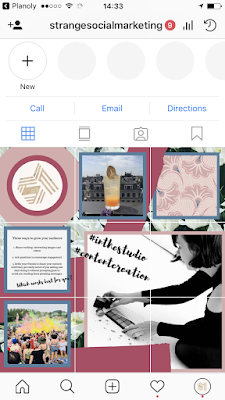
Here's how the first 3 pics look on my feed, hopefully you'll give us a follow over at @strangesocialmarketing to see the rest ;-)

I hope this has helped, whether you use an app or the online tool I would love to see your creations, tag me @katyclouds or my new business account, @strangesocialmarketing.

Katy x

Monday, 30 April 2018

Following Hashtags & Growing Your Instagram Audience


Do you follow any Instagram hashtags? If not, you are seriously missing out, not only on discovering amazing new accounts that aren't selected by Instagram to be on the Explore page but also on reaching a much wider and more relevant audience.  I'm so excited to share this as discovering this feature has been one of the things that brought me round to LOVING Instagram again and actually seeing a benefit from using it to promote my blog and other online ventures. It's easy to feel stuck in a rut, that your images are only getting seen by the same few people - break out of the mold and start using these hacks (are they hacks? I feel like hacks might be one of the most overused words on the internet) to set yourself apart from the masses!

 I've spent the last few weeks looking for information about this relatively new option and for once, the Blogosphere has come up wanting. I'd love to know about any other articles written on this subject from a similar perspective.

Here is how you do it, really simple. Just type the hashtag you want to follow and then click 'Follow' on the search results screen.


Easy right? The results will show up between content from users you have chosen to follow along with the username of the creator and the relevant tag.

I've always struggled with hashtags and which ones are the best to use. It's all very well that there are over 2 million posts under #nomnomnom but is anyone actually SEARCHING for that hashtag? It doesn't seem likely to me. I believe that there is a big difference between hashtags that are top searches and hashtags that are used on the regular. It's pretty hard to find this information online as it changes so often. One of the things you can use the follow hashtag feature for is to follow hashtags that you have been using on your own content, see how your content fits in and what other users are tagging their similar content with - #ukbloggers is a great one to start you off.

It's not the simplest thing to find out how many people follow individual hashtags, I have yet to find this information in a useful list form that I can link to. Occasionally, slid into my regular feed I'll see a little section like this which is another great place to find relevant hashtags to put in my caption:


Since I started using this trick, I've have a major jump in my Story views. As you can see above, following a hashtag means that all Stories marked with that hashtag will show up in their own little circle on your Explore page.

I've followed my hometown hashtag and I find that people tend to tag their Stories when they are going to the gym or eating out, it's given me a great insight into where is best for Sunday roasts in my town, as well as helped me to discover lots of local content creators who I like to follow and support. I now make sure to add a hastag and a location tag to every single one of my Stories and no word of a lie, it's improved my Stories views by hundreds. I used to get around 100 views on most of my Stories and since I've been tagging as much as is relevant, I've jumped up to getting an average of 400-500 views each and quite a few of those viewers turn into followers. The tags don't need to be super-obvious, you can actually make them small enough to blend in pretty well with your image if you don't want them spoiling your aesthetic.


Some of the biggest success I've had from this has come from locations and event tags. I've already mentioned above how using a tag relevant to my home town (literally just the name with a hashtag before it) has made a significant impact on my Instagram Story views, but I've also found that some of the best way to get views from new potential followers is to use relevant event and location tags on your images and Stories wherever possible because people are following these high-traffic hashtags.

When the #trippinwithtarte event happened, I did an experiment to see if this hashtag was getting a huge number of views on Stories. I used some actual Tarte make-up so my post wasn't a total sore thumb (keeping things relevant is key to turning all this extra reach into a growing audience) and I actually hit nearly 900 views on the Story.

I tag a location into all my content now, both my pictures on my main feed and my Stories and although I've been trying quite a few new things to grow my Insta, I'm convinced this has had a significant impact.

I also followed the #trippinwithtarte and several other major beauty launch hashtags and will continue to do so. This means I get some great beauty content and I'm coming across new make-up artists and beauty bloggers on my feed that I would never have found through the explore page. I try to engage with as much of this content as possible too, which also generates new followers and engagement on my own account. Now, I look out for hashtags that are relevant to the UK blogging community and I follow them to, I've really found some amazing Instagram profiles this way that have inspired me to become a better creator myself.
Once you have spent a few days adding these tags to your Stories and posts and finding new bloggers and creators through hashtags that you are following, you'll be able to start using this information to improve your reach and impressions. If you have found a tag getting you a significant increase in Stories, chances are it will have the same impact on the main content that you are pushing out, as it often means there are a lot of followers of this particular hashtag. I have found that many of the hashtags that I use regular don't have anywhere near the impact that I thought they would when I include them on Stories, so I've dropped them out of my regular copy & paste hashtag job and I'm switching in tags that seem to attract a much higher number of views.

The only way that a new follower will come across your Story is if they are actually searching for the specific hashtag that you included, so experiment with lots of different locations, events and individual tags to try and build a unique set of hashtags that will contribute towards getting your content in front of a wider audience.


Every individual will have a different set of hashtags that work for them and will be following a completely different set of hashtags themselves. You can see which hashtags a user is following by clicking the 'following' number on their profile and then selecting 'hashtags' on the page that their following list is shown. This is super interesting as it's a great way to find new hashtags to tag and test out, but it's also one of the things that promoted me to write this post. So few of my favourite social media agencies, influencers and content creators are following any hashtags at all! It's such a useful and interesting feature that I've made it my personal mission to try and get more people following hashtags in this way. Many of the bigger influencers that I follow have created their own hashtags for their fashion, travel or lifestyle content and this is another fun way to utilise this feature - you won't miss any of their content.

You could follow the tag for your favourite photo editing app, your favourite brands, influencers or charities to see their content more regularly. What about following the hashtag for a festival you are attending or your favorite resturant or holiday destination for serious lifestyle inspiration. Which hashtags are you following? I'd love to hear them in the comments below,

Katy x


Friday, 2 February 2018

Why Do Brands Take Influencers On Expensive PR Trips?


What a week for new beauty releases! I've seen the most insane PR packages and trips. I honestly love how fast-paced the beauty industry is moving at the moment. I spotted 4 separate 'blogger' or launch events happening yesterday across my social media feeds and they each looked their own kind of incredible.

When launching a new product or store, introducing a new face or having a rebranding, the current preference for glitzy, no-holds-barred events is a part of a trend called Experiential Marketing. It's been predicted as being 'big' for several years on digital and tech blogs but it's taken some time for brands to get used to spending their budgets in this way and so we are just starting to see something really awesome happening in the sphere of Influencers. Brands are beginning to understand that not every aspect of marketing can be measured in a quantifiable way. Experiential Marketing is about giving consumers an experience that will increase their propensity to purchase, even become an advocate for, the brand. In turn a wider audience is then exposed to positive feelings about the product. This snowball effect is extremely valuable!


At the Benefit Cosmetics #raiseabrow event last year

I was inspired to write this post after I saw quite a bit of moaning on Twitter. Two nights in a country hotel for a new cleanser?  The Maldives? For a MASCARA?  How can this possibly be beneficial for the brand and why are they splashing out thousands on a very small minority and then charging a high price for the product when us mortals have to purchase them?

Brace yourself, sensitive snowflakes.

If you are going to work in social media, expect brands to pay you for your content and ideas and promote yourself as an expert in the subject, you need to know your shit.

I'm really surprised by some of the people I've seen negatively commenting on bloggers attending events, especially when the general mood of the blogosphere finally seems to be turning in a 'support each other' kind of direction.  So I've written below some of the ways that these launches can benefit the brand in a much wider way than just promoting the individual product and how it benefits you too.

Brands have had to completely change the way that their marketing budget is allocated in the last three years. From point blank refusing to pay bloggers to signing up content creators on £100,000 contracts, things have gone from zero to hero for those of us that love to write about and photograph our lives. When I first started working in Influencer marketing, I was convincing decision-makers of the three ways that working with Influencers could help to grow their business.
  • Increasing the number of followers their brand accounts had
  • Raising general awareness of the brands existence
  • Direct sales (became a lot more relevant with the advent of Instagram Stories 'swipe-up' function)
All three of these are measurable to some extent. You can watch a brand's follower count go up when you see an influencer posting about them. Brand awareness can be measured in tags and mentions and direct sales are counted by total sales, of course. A combination of this data should help a brand target the Influencers to keep working with, the type of content that works for them and so on. This ability to use the data to hone future campaigns is a secondary benefit which works infinitely better online than it can do in print as you can test different content and users easily with A/B testing. This is where you trial something on a selection of your potential audience, and something else on another group.


At the launch for Deciem x ASOS

Each of these desired results has certain ways it can be achieved - for example, if you want to increase your follower count then running a contest that involves following that account would be an ideal way to achieve it.

So, we have all these ways of creating campaigns, mixing and matching your desired results with A/B testing of audiences and content. Brands usually have to select what they want from a campaign.

Experiential marketing does all of this and more.

But what brands really want these days is for their fans and users to be creating content for them, independently. This is the holy grail of online marketing in the current climate. Imagine you are launching a product and you've given it a kooky hashtag. If you check that hashtag daily, you want to see people tagging your product in their images. In the case of beauty brands, this is so valuable because of the possibility of using so many different products in one images. You could easily feature 15 or so brands in one picture of your made-up face and tagging with the brands individual hashtags is the first step towards getting that brand to notice you. If they notice you and your image is of a high quality, you might get shared on their page. Boom, 4 million people are looking at your photo, This can have an earth-shattering impact on your own follower count.

 If a brand seems to be sharing a lot of Influencer's content to their audience, sending out amazing PR packages and taking bloggers on holidays that most people can only dream of, it becomes aspirational to be noticed and featured by these brands. This in turn makes their products more desirable, as you aren't going to be featured on Kylie Cosmetics page wearing a knock-off dupe liquid lip. For those bloggers that don't actually take pictures of their face but create elaborate flatlays and studio set-ups - the same goes. They need to buy the product to create the content. Then their followers see them buying and recommending the product and go out and buy it too - this is where micro-influencers fit in and play their part in the campaign. Essentially, creating content on a brand's behalf in exchange for a potential feature.

This is the crux of Experiential Marketing - for the cost of hiring an aquarium for the day and giving away some of your product in mermaid packaging, you can create an experience that gets shared millions of times, something that isn't always possible to get when paying individuals to create content - although that's obviously incredibly valuable too!

One of the negatives I've seen so far is that EM is more difficult to measure. I don't know how brands are going to be analysing whether the thousands and thousands they spend on events with spaceships coming from the roof, covetable merchandise (who else wanted a Too Faced sunhat last summer?) and masterclasses added to their sales. This will be really interesting to watch and research. I'll be keeping an eye on new launch hashtags and how long it takes content to start getting created by aspiring make-up artists and micro-influencers.


The Boohoo Spring/Summer Press Day 2017

I LOVE the movement towards this type of promotion and PR. It means brands have the opportunity to really infuse their personality and their ethos into launches, making it an exciting time to work in the beauty (and fashion and lifestyle and fitness...) industries. Once the longer term effects on sales and brand awareness can be measured I believe there will develop a whole secondary industry dedicated to putting on these type of events with the most success. In the meantime, the only way anyone gets to be involved, whether it's an all-expenses paid trip to Bali or a pool party in central London, is to create amazing content - moaning about it on Twitter won't get you anywhere at all.

I hope this has given some background as to why brands are creating these experiences, I would love your comments below on amazing events you have been to and how they made you feel about a product or brand - please do leave a comment.

I'm currently available for consultation and digital content projects. You can email me on katycloudsofficial[at]gmail.com or tweet on [at]katy_clouds

Saturday, 23 September 2017

Copyright And Using Music In Your Content


Instagram deactivated my account! What’s a copyright warning? What music can I use on my Instagram videos?

These have been the burning issues in my inbox this week and I’ve been doing a LOT of research, so I wanted to share in one place everything I’ve learnt about the situation.

I work with a range of influencers in my day job – many of them, especially in our ‘beauty’ category, utilise music in videos that they create for collaborations and organically-generated content.

I'm not a legal expert, so my advice here is focused on the specifics of avoiding issues with Instagram and YouTube when it comes to using music that you don't have specific permission to use - I've included links below for various sources of more information regarding the legalities, what is classed as 'Fair Use' and what else you can do to keep your account safe.

Here is everything we know so far, and if you are just here to find out where you can obtain Royalty-Free and Copyright Free music for your own videos and content, scroll down to the bottom for the links.


Facebook now owns Instagram and this has meant a number of changes to both platforms. The ridiculous and useless integration of Instagram Stories into Facebook’s mobile app is one of them (seriously, do you have ANY friends that use it? I don’t.)

One of the more behind the scenes changes has been that Facebook as implemented a cross-platform music-tracking algorithm with a pretty high level of sensitivity. What this means for the average user is that even if you have music on in the background of your videos you could still be issued with a copyright warning and even account deactivation. We aren’t currently sure how far this extends and there’s no evidence that it applies to Instagram Stories, but I’d strongly recommend erring on the side of caution and not using music that you don’t have the rights to anywhere on either platform, especially if Instagram is a source of income for you as you could potentially be accused of using music without a license for commercial use 


I've spoken directly to several employees of Instagram and I have quite a bit of information about what is and isn't okay.
  • Don't use music you have purchased from iTunes on your Instagram videos or YouTube content. The permissions granted to you in downloading music in this way do not cover use as background to your digital content.
  • Do find royalty-free music through a third-party website - you'll probably have to pay a fee and make sure to read the terms and conditions properly - it might be okay for you to use a track for personal videos, but not okay for commercial use, which usually carries a higher licence fee that for personal use. Commercial use covers creating content for brands, by the way.
  • Don't think you'll be okay if you credit the artist - attribution is not a way out of respecting an artists copyright.
  • Do connect with upcoming artists that might grant you permission to use their music in exchange for a credit on your posts and definitely get their permission in writing and take a screenshot of the message, you can use this if an issue does arise to prove you have permission to use the track.
  • Don't try and get round the rules by 'putting music on in the background and pretending not to realise that counted - Instagram won't care and their software is clever enough to put up even small snippets of music
  • Do make sure you check the email address associated with your Instagram account, that's where any warnings about copyright violation will go to.
  • Don't make the mistake of thinking that old content won't be spotted - you need to remove any content you have up that has music that you don't have specific permission to use for your account to be completely safe.
  • Do tag any artist that gives you permission to use their product and write "Music by @soandso, used with permission from the artist"
  • Do check out this list (click here) of permissions granted by artists for their music to be used in YouTube videos


(This section refers only to Instagram as I haven't got experience in regaining accounts on other platforms)

If one video gets taken down, get permission to use a piece of music and put it back up. If you suddenly find yourself with an inbox of copyright violations, don't panic. If your account is still active (or even if it's not, see below), it's salvageable.  Go through and archive all of your content that has music playing. This might seem like a pain but it's nothing compared with regaining those 8, 12, 20 or 100K followers back will be.

Steer completely clear of using music for a few days and then make sure you read through the resources below to start building a library of music that you have permission to use.

If your account has been deactivated - there are still things you can do to regain control. Firstly, try and make a note of what you think might be causing the issue (Do you have old videos with Rihanna songs way back on your feed? Can you hear an Ed Sheeran track in the background of your prank video?)

Head here: https://help.instagram.com/contact/606967319425038

Fill in the form. My advice is stay concise, explain what you think is causing the issue and apologise. Make it clear you understand why your account was removed and will do everything to rectify the situation and it won't happen again. Steer clear of emotional pleas because they get thousands of requests a day. The team at Instagram's Intellectual Property department will review your case within a few days and hopefully will give you another chance - if they do reactivate your account, be aware that it will still have a flag on it that indicates to the platform that you have been caught violating copyright. You won't get your account back if you do it again.

If none of this works and you aren't getting anywhere with the form - I do have several email address for the IP department at Instagram and would be happy to pass one over - you can email me by clicking here and I'll tell you my most current contact information.


I'm going to add to this post regularly when I find further links, resources and information on this subject, so I'll try to keep the below up to date. Please do feel free to add a link to your favourite resource, royalty-free music, artists looking to connect with content creators etc in the comments and I'll be happy to add them here.


Here is a list of places that you might consider obtaining music that you have the correct permissions to use


I hope this has helped, I'm happy to answer any questions to the best of my knowledge and please do leave a comment if this post as been beneficial to you.

Katy xx


Friday, 15 September 2017

What is an Echo Chamber and Am I In One?


An Echo Chamber, when referring to the online community describes how you will hear your own views validated, amplified and reinforced. It leads to a dangerous thought process – “everyone feels the same as me” – to put it bluntly, they don’t.

Think about the people you follow and interact with online. If you are in a metaphorical Echo Chamber, most of the individuals that you interact and engage with on a regular basis fall into the follow categories. People you admire. People who inspire you. People who have similar jobs, social economic backgrounds and lives as you. People who have similar views. These people probably feel the same as you about the big issues of the day. Feminism, Terrorism, Racism, Equality, Global Warming. All big issues and most people have a strong enough view that they will openly admit they come down on one side of the fence. I haven’t met anyone who is ‘on the fence’ about global warming. I have met people who think it doesn’t exist and people who dedicate their lives to protecting the environment. These issues encourage strong views.

The problem is, the current climate on the internet is building to one of an almost fanatical intolerance towards any sort of debate or disagreement. I was recently blocked from a popular feminist’s Twitter feed because I stated (and I still believe, rightly) that it was ridiculous to try and ban the word ‘Feminine’ in relation to feminine hygiene products. Personally, I’d rather spend the time campaigning for girls who have to skip school because of their period in this county (this happens – google it) than trying to get yet another part of our standard lexicon banned – I don’t agree that seeing the word should ‘trigger’ anyone and I personally think that if it does, they should grow a fucking backbone – don’t worry, I know this is a #unpopularopinion but I’m still entitled to it. I’m #sorrynotsorry if that triggers you.

Deleting and blocking people who have different views to you isn’t going to help you accept and be tolerate of the world around you. It paints a false picture, that everyone feels the same way and you are on some sort of crusade together against the trolls that disagree.

If all of your friends are super-liberal, middle class white people around the same age, how are you ever going to be able to understand and interact with anyone not in that socio-economic group? If you are blazing through your life thinking that you are right and that’s it, because the group you surround yourself with completely agrees with you and anyone who doesn’t is triggering some sort of anxiety in you so deep that you feel the need to erase their terrible opinion completely from your mind and vision, you need to branch out. Not everyone is the same and not everyone will always agree with you and that is a beautiful thing that the most intelligent, successful and happy people in the world are able to understand.

Beware the Echo Chamber. It can convince you that everyone is in the same boat, that everyone thinks the same. It can encourage normalisation of behaviours that are not accepted in wider society. If every single person you know smokes Cannabis and talks about smoking Cannabis and treats it very normally, does this mean society as a whole is accepting legalisation? Nope, it just means you have surrounded yourself with people whose moral compass points the same way on this factor. Try going to a Woman’s Institute tea party and having a discussion about using CDB oil to treat rheumatoid arthritis. You won’t get very far.

This isn’t a dig to anyone who does delete people who disagree with them. You might want you online space to be all fairies and rainbows and happiness and butt-licking, but it’s vital to be aware that in doing so, you are creating a false and fragile community that doesn’t offer a real reflection of the world, in the wider scheme of things, you are doing something even more dangerous to your own mind – convincing yourself of a false reality and closing yourself off the a diverse and beautiful world of opinion, debate and disagreements.


I want your opinion on this post – negative, positive, on the fence, you don’t like my hair, whatever. All opinions are valid here – I don’t want to be in an Echo Chamber. 

Friday, 21 July 2017

How Do I Get A Blogging / Influencer Agent and Do I Need One?


In my day job, I'm an Influencer agent at a major talent agency. I manage the calendars and collaborations of people with significant Instagram, blog or Facebook followings and I work on pitching them to clients to fulfil briefs that require influencers.

In a typical day, I might receive requests for:
  • Beauty Influencers with a high UK audience
  • Fitness Influencers that are currently not sponsored by protein brands
  • Mummy influencers with children under 5
  • Gaming Youtubers who want to trial new game apps
  • Travel Influencers who want to go on paid adventures
My job is first and foremost to fulfil the briefs that come in and to make sure that our department is reaching out to companies to let them know that we are here and we have the influencers that they need to fulfil their digital content needs. I spend a lot of my day talking about the three major benefits of Influencer marketing, raising Brand Awareness, gaining Follow Acquisitions for client's social accounts and generating immediate direct sales driven from an influencer posting content created around a particular brand.

Obviously, to do all of this, I have to have a roster of Influencers, bloggers and content creators that I can call on. These individuals need to span the complete spectrum, from very small, up and coming beauty bloggers who might consider creating a post in exchange for gifted product and a mention on a big beauty brands instagram page, to major Youtube stars that can gain millions of views and downloads for a new app.

I find these influencers in lots of different ways, including going to blogger events, networking with other agents and beauty PR's, scouring Instagram and...incoming applications.

The point to this post today, was to give some information about what an agent does and why you might need one. I speak to a lot of up and coming influencers and bloggers who feel that getting an agent is the next logical step to take them to the upper echelons of the blogosphere. To put it bluntly, it's not.


My job is not to develop you, not to grow you into a major influencer. That's your job. The content that you create, the organic content, is what will make you stand out among a see of want-to-be influencers and social media stars. I get approached by people with 10K followers in Instagram saying they are ready for an agent - you aren't. The brutal truth of the matter is that an agent is only going to be interested if there is decent money to be made and at that level - there isn't.

Don't get me wrong, I'm still interested in hearing from you. I often get invites, emails about gifting (or 'seeding' collaborations and other opportunities that our higher-level beauty influencers simply won't consider and it makes the agency looks significantly better if we are always able to fulfil a brief, plus I'm obviously interested in watching your Instagram and blog grow in popularity until such a time that you do perhaps require an agent.


So how do you know if you really need an agent? Here's a little checklist.
  • You are getting approached by brands and being offered paid collaborations
  • You don't know how much to charge these brands, but you know that your platforms are definitely worth money
  • You need help with invoicing and the admin side of Influencer work
  • You want to turn previous collaborations that have been on a gifting basis into a longer term paid collaboration with a brand
  • You are getting people pretend to be you on social media
  • You think it's time you were verified
  • You have more than 100K followers or subscribers on at least one channel.
If more than two of these sound like you, it's time. Get contacting agencies in the space you want too work.


Influencer platforms are springing up everywhere. I get several emails a day about them. From Influenster  to River and millions more, these platform promise that they affiliated with all the top brands and will bring the work to your inbox without you having to lift a finger and in some cases, they do work. I would recommend them if you aren't quite answering 'yes' to two or three of the above questions but you are ready to dip your two into paid collaboration.

An agency manages your Influencer career. You'll be assigned an agent who will be your go-to. You'll speak to them several times a day sometimes about opportunities, working with them to get the best rates and the best collaborations. They will reach out on your behalf to brands that you have always dreamed of working with and they will make sure all of the invoicing and admin stuff is done for you so you can sit back and do what you are good at - content creating.

Don't get me wrong, there's a place for Influencer marketing platforms and I don't see them as my competitor, but they fulfil different roles and it's likely you'll need one before the other.


Now you have established that you are ready for an agent and you aren't looking for someone to help you develop yourself as an influencer, but someone who can pitch you to global brands and start getting you those big-money deals - it's time to put yourself out there. I'd strongly suggest going for a well-known, reputable agency that has a good roster of influencers. Here are some other things to check out:

  • Does the agency have an office premises? You don't want some fly-by-night managing the career that you've worked this hard on
  • What's their reputation? Talk to some brands about the agency - you probably have PR contacts already and most of them will know the big agencies and the right contacts there - they might even recommend a particular agent to you
  • Do they have people that you admire on their roster? If they only have one or two minor reality TV stars from 2006 they might not be best for your 400K beauty platform
  • Do the people that they represent seem to be working quite a bit? A reputable agency will always be happy to share who else they represent - check out their Instagram feeds and blogs and establish if they seem to be getting good opportunities. 5 teeth whitening companies in a month would be a no, an amazing-looking trip to the Bahamas with a cosmetic brand would probably be more of a yes!
  • Are you able to speak to someone on the phone and if so, do you like them on first impressions? I won't take anyone on that won't speak to me on the phone.
  • Do you they ask you to share your Instagram insights and other stats and seem interested in verifying how you have grown yourself, or do they seem over keen and not interested in your history? This is a red flag for sure, you don't want to work with an agency that takes on people who they don't properly verifying - brands will pick up on that super quick!
Finally, do your research. The right agency won't pressure you into signing a contract or true and promise you all the best jobs. Working with an agent is about selecting and pitching for the right opportunities that will resonate with your audience and keep your following trusting you. No agent should ever promise anything - they probably won't be able to deliver and you'll be in too deep to know what to do. 

I'm happy to give advice on this subject, and even consider adding you to our roster if you have the potential and I believe that our clients will be interested in you. You can find my work email over on my Instagram, @katyclouds

Hope this has helped! Feel free to ask any questions in the comments section and I will reply with haste x

Similiar Posts...